Columbia Campus Augmented Reality Demonstrations
 |
|
Columbia University |
|
Columbia Campus Augmented Reality Demonstrations |
|
Introduction
Augmented reality has the potential to visualize information directly within the context of the real world by overlaying graphics on what we see. We present examples from prototype augmented reality systems that show information about areas at Columbia University and its surroundings to show some of the ways in which information might be displayed, emphasizing the automated layout of overlaid graphics.
Information at a Glance
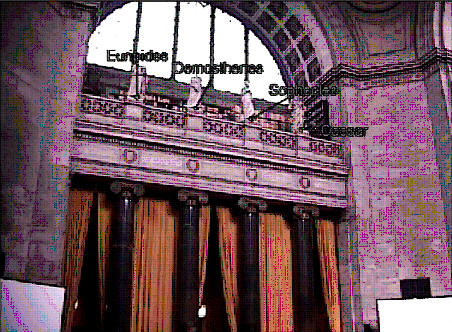
We are especially interested in how an AR system could provide “information at a glance” to aid a mobile user exploring an unfamiliar environment. Such a user might be a tourist visiting a foreign city, or even a native trying to find an office building from its address. For example, Figure 1(a) was imaged using one of our prototypes in the rotunda of Columbia’s Low Library. Here, the user sees the identities of the four statues on the balcony visualized as overlaid labels. (This image was created by video mixing the virtual information in real time with the output of a video camera whose position and orientation are tracked.) If the user had consulted a conventional guidebook, she would have needed to find a textual description or picture of the statues and correlate it with the statues, a time-consuming task. In contrast, using our prototype, it is possible to view this information simply by glancing at the statues.
|
(a) |
 (b) |
|
|
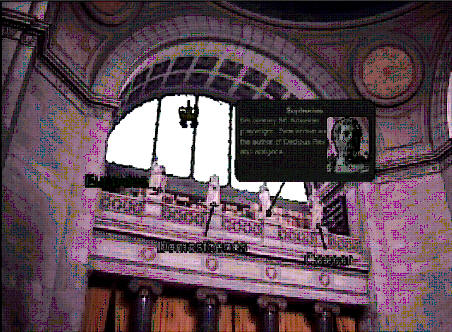
Figure 1. (a) Statues labeled by AR system. (b) Popup window provides additional information about selected object. |
||
Users can also ask the system for more information. Figure 1(b) shows what happens when the user requests more information about the statue of Sophocles. A popup window is created that displays a brief textual description of the Athenian playwright and a close-up view of his statue. The popup window replaces the label and is defined with the same priority and relationship to the statue; therefore, it also avoids overlapping the statues and the other labels.
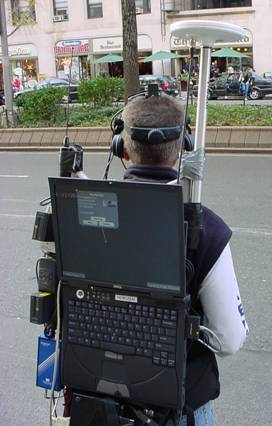
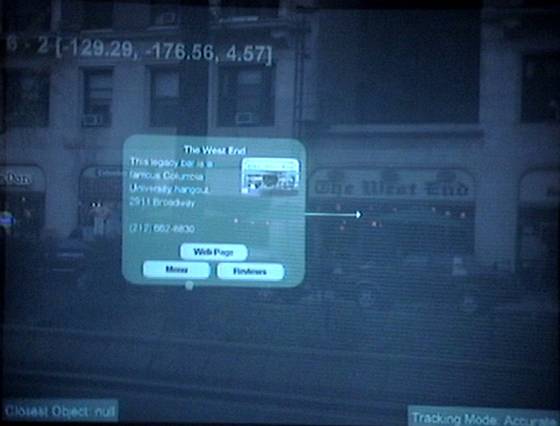
We have used a similar approach in an outdoor prototype. Our mobile augmented reality system, shown in Figure 2(a), consists of an external frame backpack on which is mounted a laptop computer with 3D graphics accelerator and a centimeter-level–accurate real-time–kinematic GPS receiver for position tracking. The user wears a color, stereo, see-through head-worn display tracked by an inertial orientation tracker and holds a hand-held display. In the figure, the user is standing on Broadway across the street from The West End restaurant. The backpack computer’s screen in Figure 2(a) displays the graphics overlaid that is viewed through the see-through head-worn display (Figure 2b). Figure 3 also shows a view of Tom’s Restaurant, the eatery immortalized by Suzanne Vega and Seinfeld, and a related popup window. In this case, the popup window has a brief description, a picture of the restaurant’s interior, and links to the restaurant’s menu, web page, and customer reviews. The popup window is placed so that it does not obscure the restaurant’s projection.
 |
 |
|
Figure 2. (a)
Outdoor backpack AR system (b) Image
taken directly through an optical see-through |
|
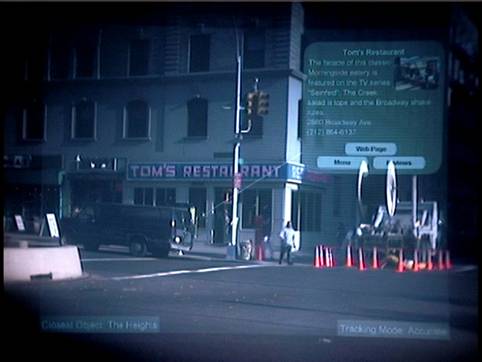 |
| Figure 3. Restaurant information appears in popup window. |
Annotated Situation Awareness-Aid
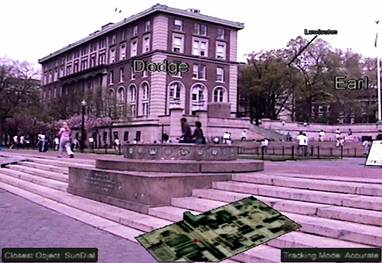
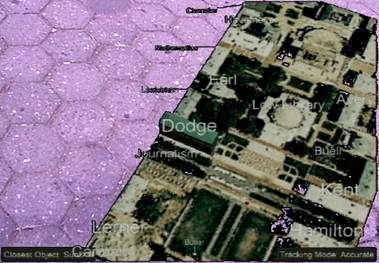
We have developed a situation-awareness aid that is intended to provide the user with an overview of the surrounding environment and the ability to discover, select, and inquire about objects that may not be directly visible to the user within that environment. Our aid is based on a world in miniature (WIM) or exocentric “god’s eye view”: a miniature overview model of the surrounding environment is embedded within the user’s view and allows user-driven view management. Hands-free control of our aid is designed to make it easy for the user in a mobile application to determine how much attention they wish to devote to the aid. Also, changes in user focus produce complementary modifications of overlaid annotations that are presented in the full-scale physical environment and in the miniature virtual aid. Figure 4 show screen shots of our annotation aid used in our outdoor AR system, showing information about building names and locations.
|
|
|
|
Figure 4. Annotation aid used in outdoor AR system. |
|
If you are interested or have more questions you can contact me at blaine@cs.columbia.edu or Steve Feiner at feiner@cs.columbia.edu.
Reference
This web page was based on:
B. Bell, S. Feiner, and T. Höllerer, View Management for Virtual and Augmented Reality, In Proc. UIST '01, Orlando, FL, November 11-14 2001. pp. 101-110.
B. Bell, T. Höllerer, and S. Feiner, An Annotated Situation-Awareness Aid for Augmented Reality, In Proc. UIST '02, Paris, France, October 27-30 2002. pp. 213-216.
B. Bell, S. Feiner, and T. Höllerer, Information at a glance, Computer Graphics and Applications, IEEE, vol. 22, pp. 6-9, 2002.
Last Updated: March 22, 2004 by Blaine Bell